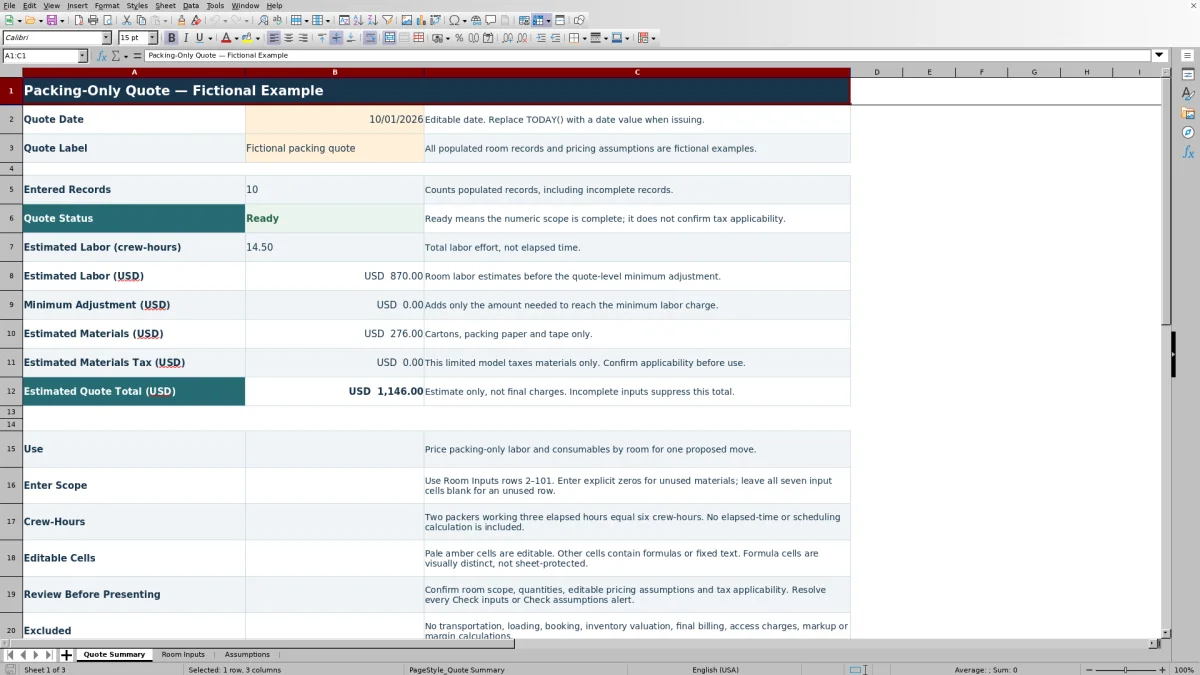
Price the packing work before presenting a customer estimate. The Mover Sheets packing service quote worksheet turns room-level labor and consumable quantities into a packing-only estimate for one proposed move.
Enter your scope, review your pricing assumptions and check the summary before issuing the quote. The populated records and rates are fictional examples, not recommended prices. This workbook does not price transportation or loading.
Where this workbook helps
- Review labor and materials room by room before presenting the combined packing estimate.
- Use shared pricing assumptions across the entered rooms instead of retyping rates on each line.
- See the additional labor charge needed to meet your chosen quote-level minimum.
- Identify incomplete numeric scope before relying on the estimated quote total.
What is in the file
How to get started
1. Save a working copy and replace the examples
Open the workbook in Excel or LibreOffice. In Room Inputs, replace the fictional records with your packing scope, or clear their input cells in columns A–G. Keep the formulas in columns H–K intact. Set a non-sensitive Quote Label on Quote Summary.
2. Review the pricing assumptions
On Assumptions, enter your labor rate per crew-hour, consumable rates, minimum labor charge and assumed materials tax rate in B2:B9. These are user-selected assumptions, not industry defaults. Confirm that Assumption Status reads Ready, then separately confirm whether the materials-only tax treatment fits the job.
3. Enter each room’s quantities
Use rows 2–101 on Room Inputs. Enter a room or packing-area name, estimated crew-hours, carton counts, paper in pounds and tape in whole rolls. Enter explicit zeros for unused materials in an active row. For an unused row, leave all seven input cells in A–G blank.
4. Check the summary before issuing
Resolve every Check inputs or Check assumptions alert. On Quote Summary, review the labor effort, labor amount, minimum adjustment, materials, materials tax and total. Replace the TODAY() formula in Quote Date with a fixed date in MM/DD/YYYY format when issuing, then save the issued copy separately from later revisions.
Set the packing scope before entering quantities
Start with the survey and decide what the crew is expected to pack in each area. Use Room or Packing Area labels that let the estimator and packing supervisor recognize the same scope. The workbook prices the quantities you enter; it does not derive carton counts or labor effort from an item inventory.
The material model covers small, medium and large cartons, packing paper and tape. If the job needs specialty containers or other supplies, document and price those outside this model rather than relabeling an unrelated input. Otherwise, the displayed units and shared rates can misrepresent the quote.
Keep the packing-only boundary clear. Transportation, loading, access charges, inventory valuation, final billing, markup and margin calculations are excluded. If the customer needs a full moving estimate, treat this workbook as the packing calculation, not as a complete price for the move.
Use labor effort, not the appointment length
Enter total labor effort in Estimated Labor (crew-hours). Add the time expected from each packer, then multiply that combined effort by the Labor rate, USD/crew-hour on Assumptions. This produces the room’s labor amount, rounded to USD cents.
Crew-hours are not elapsed hours. When several packers work at the same time, their combined labor effort is greater than the elapsed appointment time. Check that your entered rate is per crew-hour of labor effort, not a rate for an entire crew per elapsed hour.
The workbook does not calculate staffing or a packing schedule. Use the labor estimate to support a separate crew-planning decision, accounting for the work sequence and the site conditions. A numerically complete row does not establish that the labor allowance is sufficient.
Fictional example: from one room to a quote
For a fictional single-room quote, clear the other example inputs and enter Office packing area (fictional) with 2.50 crew-hours, 3 small cartons, 2 medium cartons, 1 large carton, 2.50 pounds of paper and 1 roll of tape.
Use these fictional assumptions: USD 65.00 per crew-hour; USD 3.00, USD 4.00 and USD 5.00 per small, medium and large carton respectively; USD 2.00 per pound of paper; and USD 3.00 per roll of tape. Set the quote-level labor minimum to USD 200.00 and the assumed materials tax rate to 8% solely to illustrate the calculation.
- Labor: 2.50 crew-hours × USD 65.00 per crew-hour = USD 162.50.
- Materials: (3 × USD 3.00) + (2 × USD 4.00) + (1 × USD 5.00) + (2.50 × USD 2.00) + (1 × USD 3.00) = USD 30.00.
- The room subtotal is USD 192.50 before the quote-level adjustment and tax.
- The minimum adjustment is USD 37.50, bringing the labor charge up to the chosen minimum.
- Materials tax is USD 2.40, giving an Estimated Quote Total (USD) of USD 232.40.
The result shows why the room subtotal is not necessarily the customer-facing quote total. Before presenting it, confirm the scope, whether the labor minimum should apply and whether the illustrated tax treatment is appropriate. None of these fictional values is a recommended rate or tax rule.
Review the labor minimum and tax separately
The Minimum labor charge, USD/quote applies once to the combined room labor estimate. The workbook calculates only the amount needed to reach that minimum: the greater of zero or the minimum minus total room labor. It does not impose a separate minimum on every room, and materials do not count toward meeting the labor minimum.
The Assumed materials tax rate applies only to the summed materials estimate. Enter it as an Excel percentage or its decimal equivalent, not as a whole-number percentage without the percent sign. Room labor and materials are rounded to cents; tax is rounded once on the materials total.
Ready does not confirm tax applicability. If the job requires a different tax base or treatment, this limited model is not sufficient for that calculation. Also review intentional zero rates: zero is accepted as a numeric assumption, so a Ready status does not prove that every supply has been priced as intended.
Troubleshooting blank totals and input alerts
A blank total is not a zero-dollar estimate. Quote Summary suppresses the estimated totals when the status is not Ready. Entered Records counts populated records, including incomplete ones, so that count alone is not evidence that the quote can be used.
- Check inputs on a room: provide a nonblank text label and all six numeric quantities. Remove negative values and numbers stored as text. Cartons and tape must be whole counts; labor and paper may use decimals.
- Check assumptions: inspect all eight values in Assumptions B2:B9. Each must be numeric and nonnegative, and the tax rate cannot exceed 100%. An invalid assumption can suppress calculations even when the room’s own Input Status is Ready.
- No rooms: with valid assumptions and all room inputs blank, there is no scope to total. Enter a complete room record rather than treating the blank result as a quote.
- Unexpected extra scope: when removing a room, clear all seven input cells in A–G. Leaving quantities behind creates an incomplete record rather than an unused row.
If expected formula results are missing, open the file in Excel or LibreOffice so formulas can recalculate. If a calculated cell was overwritten, return to an intact copy and re-enter the inputs. The workbook’s visual distinction between inputs and formulas does not prevent edits to formula cells.
Compare with a blank estimating spreadsheet
Choose the workflow based on how closely the packing scope fits the model. This workbook supplies a defined calculation structure; a blank spreadsheet leaves both the structure and its checks to the person building it.
| Method | Scope and entry | Calculation review | Flexibility and limits |
|---|---|---|---|
| Mover Sheets packing quote workbook | Up to 100 room or packing-area records using a fixed set of labor and consumable inputs. | Includes room status checks, shared rates, a quote-level labor minimum and materials-only tax. | Fits the supported packing-only model; does not include specialty supply fields, access charges or margin calculations. |
| Blank estimating spreadsheet | You define the fields, units and room structure before entering the scope. | You build and test formulas, completeness checks, minimums and tax treatment. | Can be designed for different charges and units, but requires setup and ongoing formula review. |
Use this workbook when its supported materials and shared-rate approach match the job. Consider a separately designed estimate when the work requires different charge categories or pricing logic. In either workflow, review the surveyed scope and the intended pricing rules before issuing a customer estimate.
Control revisions before the customer or crew handoff
When the customer adds another packing area or changes who supplies the cartons, save a dated copy of the earlier estimate before editing. Change the affected input quantities, then review both the room results and the overall quote. A quantity change can affect materials tax, while a labor change can alter the minimum adjustment.
Keep a separate note of what changed and any scope that still needs confirmation. Do not assume the workbook preserves a revision history or notifies the customer. Its Quote Date begins as TODAY(), which can change on recalculation until replaced with a fixed date.
For the handoff, make sure the packing supervisor has the current room scope and understands that estimated crew-hours are an effort allowance, not a scheduled arrival or completion time. The summary is an estimate of packing charges, not final billing, a binding interstate tariff or a contract.
Frequently asked questions
Can I use this worksheet for an office packing estimate?
Yes, if the office packing scope fits the supported labor and consumable inputs. Use recognizable office-area labels and estimate the quantities for each area. The workbook does not provide a separate model for equipment handling, specialty containers or other services outside those inputs.
Can different rooms have different labor rates?
Not within the supplied calculation model. Each room uses the same labor rate from Assumptions, and each consumable also has one shared rate. If areas need different pricing bases, use a separately reviewed estimating approach rather than overwriting room formulas without checking the consequences.
Does the paper weight represent shipment weight?
No. Packing Paper (pounds) is the quantity of packing paper used to calculate its material amount. It is not the weight of the packed contents or shipment, and the workbook does not calculate shipment weight.
Will rows added below row 101 be included in the quote?
The supplied room formulas and summary ranges cover rows 2–101. Do not assume entries below that range will be included. If the scope exceeds 100 records, use an appropriately reviewed expanded model or reorganize the scope without losing the detail needed to check it.
Can I use the estimate to measure profit?
The workbook calculates amounts from the rates you enter, but it does not separate internal costs from selling prices or calculate markup, margin or profit. Review those questions in a separate costing process before deciding what rates to use.
Editorial coverage

Nolan FairchildEstimating & job planning
Editorial scope and contact →
Mira WexfordPacking & job records
Editorial scope and contact →