Turn a reviewed inventory into estimated charges before sending a price to the customer. The Mover Sheets moving company estimate template combines item quantities, handling labor, material selling charges and access assumptions in an Excel workbook.
Use it to document the scope, state exclusions and review the calculated estimate. All populated sample records are fictional. Replace them with your reviewed inputs; the workbook is an estimating resource, not a booking system, final invoice or contract.
Where this workbook helps
- Connect inventory quantities to estimated volume, combined labor and material selling charges.
- Keep additional access labor separate from the non-labor access charge to help avoid double counting.
- Identify incomplete inputs before relying on the estimated totals.
- Review the labor minimum and stated exclusions before sharing an estimate.
What is in the file
How to get started
1. Save a working copy and define the scope
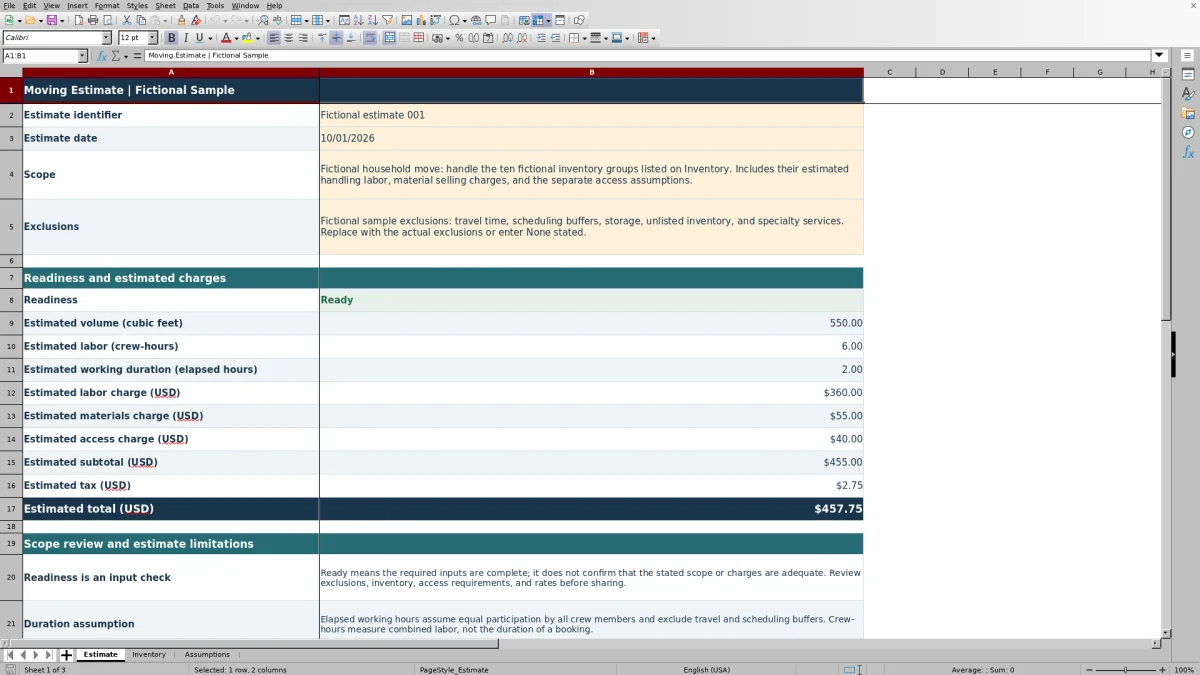
On Estimate, replace Estimate identifier, Estimate date, Scope and Exclusions. Use an MM/DD/YYYY date and a non-sensitive job reference. Describe the work being priced rather than leaving the fictional sample wording. If appropriate after review, enter None stated in Exclusions instead of leaving it blank.
2. Replace the fictional inventory
On Inventory, enter descriptions and quantities in rows 2–101, followed by cubic feet, estimated crew-hours and estimated material charge per unit. Use Estimator notes for handling assumptions. Clear unused sample inputs in columns A–E and I, but preserve the formulas in F–H and J. Check Record status for each active row.
3. Set the pricing assumptions
On Assumptions, review the labor rate, minimum labor charge, crew size, access charge, tax rate and additional access labor. Choose Yes or No for Tax labor, Tax materials and Tax access. These are editable job assumptions, not standard industry rates or tax rules.
4. Review results before sharing
On Estimate, check Readiness, the charge breakdown and Minimum labor review. Compare the results with the survey and confirm the stated exclusions. Pale amber cells are intended for editing; formula cells are visually distinct but not locked. Keep an unchanged source copy so an accidental formula edit can be recovered.
Build inventory groups that match the survey
Group items only when the same per-unit assumptions reasonably apply. Quantity multiplies each row's cubic feet, estimated crew-hours and material selling charge. If items require different handling or materials, separate them rather than hiding those differences in one group.
Enter a positive whole-number Quantity for each active row. Cubic feet per unit, Estimated crew-hours per unit and Estimated material charge per unit (USD) must be numeric and nonnegative. A reviewed zero is allowed in those per-unit fields, but it means that component contributes nothing to the estimate. It is not a placeholder for an unknown amount.
Use Estimator notes to explain the basis for unusual handling allowances or grouped quantities. The workbook multiplies your inputs; it does not derive labor time from an item description or from volume. Resolve uncertain survey details before treating the resulting price as ready to send.
Separate combined labor, working duration and access charges
Price the combined work effort first. Estimated labor (crew-hours) adds the inventory labor to Additional access labor (crew-hours) from Assumptions. That total is multiplied by Labor rate (USD per crew-hour), then compared with Minimum labor charge (USD). The larger amount becomes the estimated labor charge.
Crew-hours are combined labor, not the elapsed time occupied by the whole crew. Estimated working duration (elapsed hours) divides combined labor by Crew size (people). This assumes equal participation by all crew members and excludes travel and scheduling buffers. Use it as a working-duration estimate, not a promised appointment length.
For access conditions that add work, decide where that labor belongs. Enter it in the inventory handling allowance or in Additional access labor (crew-hours), without counting it twice. Access charge (USD) is a separate non-labor amount. Explain its basis in the scope or notes, and do not use it to charge again for labor already included elsewhere.
Changing crew size alone changes the calculated duration, not the combined labor or labor price. If a different crew arrangement changes the expected work effort, review the labor inputs themselves.
Fictional example: from carton inventory to estimated total
This fictional illustration uses one active Inventory record with all other inventory input rows blank. Enter Fictional carton group as the description, a quantity of 8, 3 cubic feet per unit, 0.25 crew-hours per unit and a material selling charge of USD 4.00 per unit. The row produces 24 cubic feet, 2 crew-hours and USD 32.00 in materials.
On Assumptions, enter USD 70.00 per crew-hour, a USD 250.00 minimum labor charge, a crew size of 2, 1 additional access crew-hour and a USD 35.00 non-labor access charge. Set Tax rate (decimal) to 0.0625, Tax materials to Yes, and Tax labor and Tax access to No. Complete the required Estimate fields with fictional scope information.
The combined labor is 3 crew-hours, giving 1.50 elapsed working hours. Hourly labor would be USD 210.00, so the minimum labor charge applies at USD 250.00. Adding materials and access gives a USD 317.00 subtotal. Only materials are taxable in this illustration: USD 32.00 × 0.0625 gives USD 2.00 tax, for an estimated total of USD 319.00.
The result is a minimum-priced labor estimate, not simply the hourly calculation. Before sharing it, confirm that the minimum is appropriate for the job, the additional access labor is not already in the inventory allowance, and the selected tax treatment is correct. None of these fictional values is a recommended rate or policy.
Check material selling charges and taxable categories
The material input represents what you estimate charging the customer, not your purchase cost. Enter the selling charge in Estimated material charge per unit (USD). The workbook multiplies it by Quantity and rounds each inventory record's material amount to cents before summing the records.
No margin or markup is calculated. If you start with supplier costs, determine the selling charge outside this workbook before entering it. A low material total may be mathematically correct while still reflecting the wrong pricing basis.
Tax rate (decimal) is one rate applied only to categories marked Yes. Tax labor includes the calculated labor charge, including the minimum when it applies; Tax materials includes the material total; Tax access includes the separate access charge. Additional access labor is part of labor, not the separate access category.
Review both the rate and the category choices. A zero tax result can mean the rate is zero or that no taxable charge contributes to the calculation. It does not establish that the job is tax-exempt. The workbook's single-rate, category-level structure also does not separately model different tax rates for individual inventory lines.
Troubleshooting blank totals and incomplete records
Blank totals do not mean a free move. The workbook suppresses estimated totals when required inputs are incomplete. Start with Record status on Inventory, then review the required Estimate fields and Assumptions.
- An inventory row says Incomplete: Check for a missing description, a quantity that is zero or not a whole number, or a blank, text or negative per-unit value. Complete the row, or clear its inputs if it is unused.
- A seemingly unused row blocks the estimate: Check Estimator notes as well as columns A–E. A note left on an otherwise empty row makes it an active but incomplete record. Remove the unused note without deleting the row's formulas.
- All inventory rows look complete but totals remain blank: Confirm that at least one record is Ready. Check Estimate identifier, Estimate date, Scope and Exclusions, then review all required assumptions. Crew size must be a positive whole number, the tax rate must be between 0 and 1, and the tax choices must be Yes or No.
- Results do not change after an edit: Check spreadsheet recalculation. The file requests automatic full recalculation when opened in Excel or LibreOffice, but that request does not certify what a particular application has recalculated.
Once Readiness shows Ready, still review the numbers and scope. Ready is an input-completeness check, not confirmation that the inventory is accurate or that the charges cover the work.
Control scope changes before the customer quote or crew handoff
Use Scope and Exclusions to establish what the numbers cover. Review the fictional exclusions rather than adopting them unchanged. Travel, scheduling buffers, storage, unlisted inventory and specialty services should be addressed according to the actual job; the sample wording is not a recommended policy.
If the customer adds items after the survey, save a dated copy before revising the inventory. Update the relevant quantities, handling assumptions, material charges and scope wording together. Then review the minimum labor message and total again. A change in labor effort may not change the labor charge while the minimum still applies.
For a crew handoff, check that inventory notes explain the work assumptions clearly enough to be useful. Keep version control and customer communication in your established workflow; do not assume this file retains a revision history or sends updates.
The estimate does not establish a lawful interstate tariff and is not a legal contract. Use it to support the calculation and scope review, not to replace any separately required pricing or contract documents.
Compare this workbook with a paper estimate worksheet
Choose the method that fits how your company reviews and revises estimates. This workbook supplies linked calculations and input checks. A paper worksheet can capture a survey without a spreadsheet application, but its calculations and completeness review remain manual.
| Method | Calculation work | Completeness review | Revisions and sharing | Scope of use |
|---|---|---|---|---|
| Mover Sheets Excel workbook | Calculates inventory extensions, labor minimum, selected-category tax and estimated totals from entered assumptions. | Flags incomplete inventory records and suppresses totals when required inputs are incomplete. | Recalculates revised inputs; you save versions and manage communication separately. | Structured estimate preparation within 100 inventory rows; not booking or dispatch. |
| Paper estimate worksheet | You calculate extensions, minimums, tax and totals manually or with a calculator. | You inspect entries and confirm that nothing required is missing. | You annotate or rewrite the estimate and retain earlier copies yourself. | Survey notes and estimate records, with no built-in calculation or booking workflow. |
Use the workbook when you want repeatable calculations from reviewed inventory and pricing inputs. Paper may suit an initial walkthrough when a device is impractical, followed by a checked transfer into the estimate. If the job requires booking, dispatch or broader job management, evaluate a separate operational system rather than expecting this resource to perform those tasks.
Frequently asked questions
Can I use this template for household and office moves?
You can describe either type of inventory using the item or group fields. Set the per-unit handling and material assumptions for the actual work, and state any excluded services. The workbook does not supply separate household or office pricing rules.
Does the estimated volume provide shipment weight?
No. Volume is calculated in cubic feet from quantities and per-unit volume inputs. The workbook supplies no volume-to-weight assumption and derives no pounds. Do not treat its volume total as proof of shipment weight.
What if my inventory needs more than 100 rows?
The supplied inventory formulas and estimate totals cover rows 2–101. Do not assume entries below that range will be included. Group items only when their per-unit assumptions genuinely match; otherwise, use a suitably expanded and checked workbook or another estimating method.
Will entering more crew members reduce the labor charge?
Not by itself. Crew size is used to divide combined crew-hours into estimated elapsed working hours. Labor pricing still uses the combined crew-hours and the rate per crew-hour, subject to the labor minimum. Reassess the handling inputs if the crew change actually alters expected work effort.
Can the workbook provide a final invoice or reserve the job?
No. It produces estimated charges from the entered inventory and assumptions. It is not a final invoice, booking or dispatch record. Handle customer acceptance, scheduling and final billing through your separate company procedures.
Editorial coverage

Nolan FairchildEstimating & job planning
Editorial scope and contact →
Mira WexfordPacking & job records
Editorial scope and contact →