Before sending a moving estimate, separate what you know from what still needs confirmation. The Mover Sheets moving estimate assumptions register gives you an Excel record of the assumptions behind a quote, their supporting references and their review dates.
Use it to prepare customer follow-up and flag unresolved details before an estimator or job coordinator relies on them. The workbook organizes support and review checks; it does not calculate the moving price or book the job.
Where this workbook helps
- Keep each assumption tied to a quote so follow-up stays specific to the estimate being reviewed.
- Distinguish missing record details from assumptions that still lack evidence or confirmation.
- Plan follow-up using review deadlines based on your chosen calendar-day settings.
- Check quote-level exception counts before returning to the individual records that need attention.
What is in the file
How to get started
1. Prepare a working copy
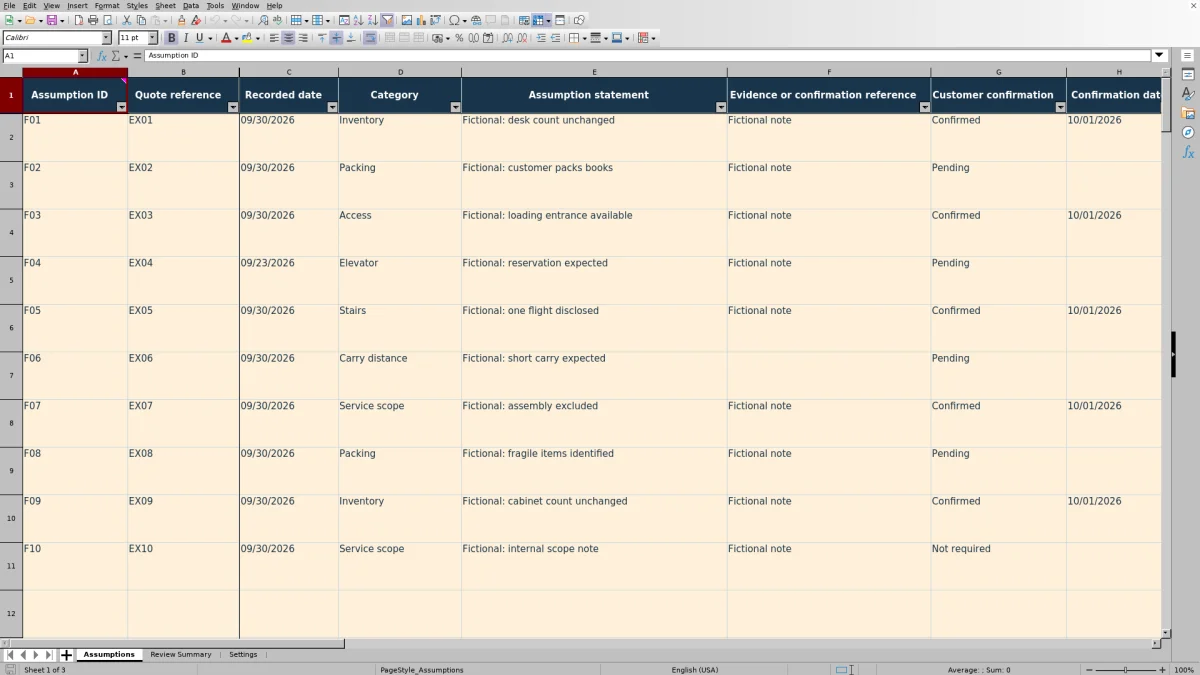
Open the workbook in Excel or LibreOffice so its formulas calculate. On Assumptions, replace or clear the fictional training inputs in A2:J11. Preserve formula columns K:N and the helper cells to their right.
2. Set the review basis
On Settings, check Review date, Default review interval and Due-soon window. Review date initially uses TODAY(); you can replace it with a fixed date for a historical review. The intervals use calendar days and are your workflow choices, not service requirements.
3. Record one assumption per row
Enter a unique Assumption ID, Quote reference, Recorded date, Category, Assumption statement and Estimator. Add an Evidence or confirmation reference and select Customer confirmation. Enter a Confirmation date only for Confirmed records. Use Review date override when a particular assumption needs a different deadline.
4. Review exceptions before using the quote
On Review Summary, enter a Quote-reference filter or leave it blank to include all quotes. Resolve input alerts and missing inputs first. Then use the filters on Assumptions to inspect unsupported, overdue and due-soon records. Check the underlying entries rather than treating a summary count as approval to issue the estimate.
Write assumptions that lead to a clear follow-up
Record one condition that could affect the estimate in each Assumption statement. A broad note such as “access to be checked” leaves the next person guessing. A fictional example such as “Customer expects the loading entrance to be available during unloading” identifies the condition to verify without presenting it as established fact.
Use Category to group the issue, and use Evidence or confirmation reference to point to the relevant survey note or customer response. A reference should help you find the source later; entering text in that field does not mean the workbook has checked the source or confirmed its accuracy.
One row is one assumption for one quote. Several rows may share a Quote reference, but each should have its own Assumption ID. Keep unrelated packing, inventory and access questions separate so a reply resolving one issue does not appear to resolve them all. Use internal references rather than placing customer addresses or unnecessary personal details in the register.
Read support status without overstating certainty
Support status checks whether the record has the information required by the workbook. It returns Incomplete when Assumption ID, Quote reference, Recorded date, Category, Assumption statement, Customer confirmation or Estimator is missing. It also returns Incomplete when a Confirmed record lacks a Confirmation date, or when a date is present for another confirmation choice.
Once those checks pass, a blank Evidence or confirmation reference or a Pending confirmation produces Unsupported. Otherwise, the result is Supported. Selecting Not required can therefore produce Supported, but only when evidence and the other required entries are present and Confirmation date is blank.
Supported is a record-completeness result, not a pricing verdict. The formula does not judge whether the evidence is persuasive or whether customer confirmation was actually unnecessary. Make those decisions before relying on the assumption. Keep rates and charges outside this workbook; neither this register nor an estimate establishes a lawful interstate tariff or contract.
Fictional example: calculate the next review decision
For a fictional packing assumption, enter Assumption ID DEMO-P01, Quote reference DEMO-Q01, Recorded date 11/02/2026 and Category Packing. Use the statement “Fictional: customer will pack all books,” an evidence reference of “Fictional survey note P1,” Customer confirmation Pending and Estimator Example estimator. Leave Confirmation date and Review date override blank.
Set the review date to 11/08/2026, the default interval to 7 calendar days and the due-soon window to 2 calendar days. The workbook adds the interval to the recorded date: 11/02/2026 + 7 days gives a Review due date of 11/09/2026. That deadline falls within the inclusive window from 11/08/2026 through 11/10/2026, so Review status is Due soon. Support status is Unsupported because confirmation remains Pending despite the evidence reference.
The next decision is to ask the customer whether the packing arrangement still holds before relying on it in the estimate. If a fictional reply confirms the arrangement, update the evidence reference, select Confirmed and enter the actual confirmation date—for example, 11/06/2026. Support status then becomes Supported, but the review deadline remains unchanged. Confirmation does not restart the review interval.
For other records, Review date override takes precedence over the calculated deadline. A deadline before the review date is Overdue; one beyond the due-soon window is Current. These are review priorities, not promises about job readiness.
Use the summary to build a follow-up list
Start with the estimate you are about to issue or revise. In Review Summary, enter its reference in Quote-reference filter at B2. Matching is exact and not case-sensitive; a blank filter includes all prepared records. Then inspect the corresponding rows on Assumptions to see what each exception requires.
Work through input alerts and missing inputs before judging urgency. An incomplete record receives Missing inputs as its Review status, so an unresolved entry problem can prevent an overdue label from appearing. After repairing the entries, review unsupported assumptions and deadlines.
Do not add every summary count together. Needs support work is Unsupported assumptions plus Incomplete records, not another separate group. Support and review counts can also overlap: a supported assumption can still be overdue for review.
Filters applied on Assumptions do not change Review Summary counts. Use the summary's own quote filter to set its scope. If it shows zero recorded assumptions and No matching assumptions, check the reference and whether records were entered; that result does not establish that the quote has no unresolved assumptions.
Troubleshooting entries, dates and missing results
- Duplicate ID: Input alerts checks for repeated Assumption IDs across the prepared rows. Give separate assumptions distinct IDs, even when they belong to different quotes. A repeated Quote reference is acceptable when several assumptions belong to the same estimate.
- Confirmation-date mismatch: enter a Confirmation date only when Customer confirmation is Confirmed. The date must be on or after Recorded date and on or before the Settings review date. Check the source before correcting a date; do not change it simply to make the warning disappear.
- Unsupported despite a note: check Customer confirmation. Pending still produces Unsupported. If confirmation is Not required, the evidence reference must still be present.
- Blank calculated results: a row with no inputs in A:J intentionally leaves its calculated outputs blank. For a populated row, check that the formulas in K:N were not overwritten and that the file has calculated in Excel or LibreOffice.
- Unexpected results after pasting: validation can be bypassed by pasted values. Inspect Input alerts and review the entries directly, including dates and dropdown values. A lack of alerts is not a substitute for checking the record.
The formula columns are unprotected. If a formula has been replaced, recover it from a clean copy of the workbook before relying on that row or the summary. Enter actual dates without times and use MM/DD/YYYY.
Handle changes before the estimator-to-crew handoff
When the customer changes an inventory or packing arrangement, preserve a dated copy of the earlier register before replacing the assumption or its evidence reference. Keep the Quote reference aligned with the estimate version your team is reviewing. This is a manual change-control practice, not a built-in revision history.
Use Review date override when a specific assumption needs attention sooner or later than the default interval. Changing Default review interval affects calculated deadlines for records without overrides; changing Review date changes the basis for review-status checks. Neither action proves that anyone has contacted the customer.
Replacing TODAY() with a fixed date can help you examine review timing against that date, but it does not restore earlier record contents. Existing confirmation dates may also fall after that historical review date and need inspection. Restore TODAY() when you want the review basis to follow the current date again.
Before handing unresolved details to a packing supervisor or job coordinator, state what remains uncertain and what response is needed. The register provides an Estimator field, but it does not dispatch work or send follow-up notifications. Communicate the handoff separately.
Compare with a manual spreadsheet or paper log
Choose the method around how your team reviews assumptions, not just how it captures notes. This workbook provides a prepared checking structure; a manual log leaves you to define and maintain that structure yourself.
| Method | Evidence and quote linkage | Review timing | Exception review | Ongoing responsibility |
|---|---|---|---|---|
| Mover Sheets assumptions register | Prepared fields connect each assumption to a quote and evidence reference. | Calculates deadlines and review status from editable calendar-day settings or an override. | Provides support checks, input alerts and quote-filtered summary counts across 100 prepared rows. | You verify sources, preserve formulas, contact the customer and save revisions. |
| Blank spreadsheet or paper log | You create columns or note conventions for quote and evidence references. | You calculate and check deadlines manually unless you build spreadsheet formulas. | You inspect records and tally exceptions manually unless you develop your own checks. | You maintain the structure, perform checks, contact the customer and preserve revisions. |
Use this workbook when a repeatable assumptions review and prepared exception counts fit your process. A manual log may be sufficient for a small number of simple questions when someone can reliably inspect every entry. Neither approach, by itself, verifies the evidence or replaces the actual estimate.
Frequently asked questions
Can I record assumptions for more than one quote?
Yes. Enter the appropriate Quote reference on each row and use Review Summary's Quote-reference filter to review one quote at a time. Leave that filter blank for all quotes. Assumption IDs should remain unique across the prepared register, not just within each quote.
What should I do with the starting records?
All ten starting records are fictional training examples. Replace or clear their inputs in A2:J11 before operational use so they do not remain in your counts. Do not clear entire rows, because that would also remove formulas and helper cells.
Can I extend the register beyond 100 assumptions?
The verified formula, validation, filter and summary ranges cover rows 2–101. Entries below that range are not automatically included in those checks. Use a separate working copy when appropriate, or have all affected ranges extended and checked before relying on a larger register.
Can I change the dropdown choices?
The dropdown source cells are editable on Settings. Keep the confirmation labels Pending, Confirmed and Not required unchanged for normal use: the formulas test specific confirmation text, so renaming those choices can change how records are classified. If you revise category labels, also review existing entries for consistency.
Does the workbook store customer documents or contact customers?
It provides an Evidence or confirmation reference field where you can record how to locate the supporting note or response. It does not retrieve or verify that material, contact the customer or send reminders. Keep source records in your established filing process and perform follow-up separately.
Editorial coverage

Nolan FairchildEstimating & job planning
Editorial scope and contact →
Mira WexfordPacking & job records
Editorial scope and contact →